If you've been following this blog at all, you'd probably like to know that Pachinguys is out! it's available at the google play store here:
https://play.google.com/store/apps/details?id=com.oren.pachinguys
Thank you all for your support and interest through the development process. now go! play! enjoy! and don't forget to share :)
Friday, March 11, 2016

Thursday, February 11, 2016
Graphics through the project
A screenshot is worth a thousand words, so here are some screenshots depicting the journey Pachinguys graphics took through the years.
Level menu:
 |
| menu 2012 |
 |
| menu 2013 |
 |
| menu 2014 |
 |
| menu 2016 |
Splash:
 |
| splash 2014 |
 |
| splash 2016 |
Level done:
 |
| level done 2014 |
 |
| level done 2016 |
Tutorial:
 |
| tutorial 2013 |
 |
| tutorial 2016 |
Game play:
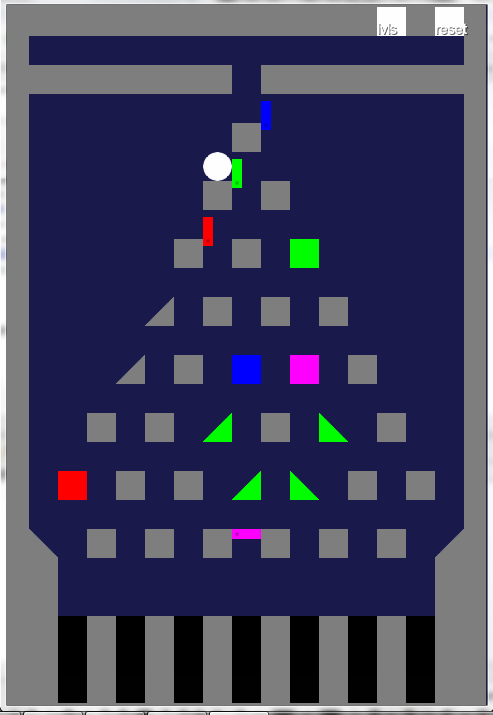 |
| gameplay early 2012 |
 |
| gameplay late 2012 |
 |
| gameplay 2013 |
 |
| gameplay 2016 |
It's amazing for me to see how much has changed since 2012, and yet how generally true the game stayed to the feel of that very first prototype all those years ago. I hope you've enjoyed this in depth look at the new graphics.
I'm happy to report that the game is still on track for it's march release. See you all on the other side :)
Thursday, February 4, 2016
Stealth mode, deadlines and progress report
Long time no
see. I’ve been taking my time, working on Pachinguys quietly for a while. But
much progress has been made, and it’s time to start sharing again.

MVP:
After
playing around with many possible features, I’ve narrowed down the Minimal Viable Project.
The special / challenge levels have been cut, leaving
“only” the base 60 levels and 3 bosses. This reduction in content allowed me to
focus on more realistic goals towards a release date. Which leads me to:
Release
Date:
Like most
people, I have a love hate relationship with deadlines. But I’ve decided it’s
time to set a hard deadline for Pachinguys. Since I’ll be turning 30 this
March, I set the release date to the end of February (because vanity). And I’m
glad to report that the game seems to be on track for that release.
Graphics:
it’s been a
long time coming, the circles and squares are (mostly) gone. I’ve upgraded most
of the games' art assets myself, using freely available art found online and some GIMP work. For the more complex / interesting assets, I’ve
contracted a pixel artist via Fiverr. His page can be found here,
I’ve been really happy with his work. I had him design the game logo,
Bosses, and the Pachinguys themselves. Do let me know what you think of their
new look.

Sound:
There will
be no music in the MVP release. I do however have some sound effects (and a
mute button). I’ve used freely available sounds. If all goes well with
the MVP release, I may add background music later, but it’s not really a
priority at this point.
Project
management:
I’ve tried
many tools, both on and offline, for managing this project. And finally concluded
that a good old fashioned excel sheet is still the best way to go (at least,
when solo projects are concerned). For me, nothing beats the versatility that a
general purpose tool like a spread sheet gives.
Beta
testing, Credits and Special Thanks:
Thanks to
the ever growing group of you, friends and family, who have helped me by play
testing and commenting on the game all this time, it is now very nearly done.
One of the things still missing is the content of the credits page. So if
you’d like to appear in the credits of Pachinguys, either as a beta tester or
under special thanks, please send me your name the way you wish it to be
spelled (no, I can’t assume you want to be in the credits and just check
facebook for the spelling, this is an opt in kind of thing, deal with it J ).
Thank you
for all the support you’ve given me through the years, it would
not have been possible without you.
Saturday, March 15, 2014
Bug fixes. Level reset and Google analytics.
Another one of the network features has now been implemented:
Google analytics integration.
Following a discussion with a coworker regarding my ad policy (specifically the "remove ads forever" button), an interesting debate arose. I claimed that giving players the power to decide for themselves if they want ads in the game was a good idea that would increase the player base, while he claimed almost every player would disable the ads which would render them pointless. We couldn't find any data on the subject so I've decided to turn Pachinguys into a bit of a social experiment.
Following a discussion with a coworker regarding my ad policy (specifically the "remove ads forever" button), an interesting debate arose. I claimed that giving players the power to decide for themselves if they want ads in the game was a good idea that would increase the player base, while he claimed almost every player would disable the ads which would render them pointless. We couldn't find any data on the subject so I've decided to turn Pachinguys into a bit of a social experiment.
Every time a user interacts with the ad removal mechanism, I log
the interaction, and send it to my Google analytics, where I can review and analyze
the data to see if any pattern emerges. Interactions include viewing the ads
removal dialog, canceling it, approving it (thus removing the ads) and unhiding
ads once they have been removed. I'm also collection other usage data like what
levels are being played, which levels the player gives up on before completing
them, which levels are completed successfully etc.
The alpha testing feedback has started to pour in. many bugs have been found
(some already fixed, others still pending). I've started using Task Coach as a local bug tracking system in order to keep up with all the reports.
Aside for bugs, a feature request came through for a "reset level" button during play (in addition to the "retry" button at the end of level). I've added this button to the latest version. Hopefully it will make testing (and playing) less of a hassle and more fun.
Aside for bugs, a feature request came through for a "reset level" button during play (in addition to the "retry" button at the end of level). I've added this button to the latest version. Hopefully it will make testing (and playing) less of a hassle and more fun.
 |
| reset level |
On a technical note, Google analytics requires another network related android
permission (check network state). So any testers would need to manually update
their version (auto update does not work when the required permissions change).
Sorry for the trouble and thank you all again for helping Pachinguys out.
Saturday, February 22, 2014
Performance tweaks, splash screen, and ads philosophy
I've finally started work on the most technically challenging and potentially
buggy group of features, the online features. Each feature will be explained as it is implemented.
These features include at the moment:
- Ads (implemented).
- Analytics (pending).
These features include at the moment:
- Ads (implemented).
- Analytics (pending).
- Cloud save (pending).
- Personal server based level update system (pending).
There are a million ways to get ads wrong. I've played so
many games where ads would break the flow of gameplay, block half the screen,
or just be too near something clickable and get clicked by accident.
With this in mind I've spent a lot of time thinking if and
where ads should go in Pachinguys. What I've decided on for now is to only show
ads to the user at the bottom of the end of level screen. My reasoning for this is as
follows:
a) The level end screen had enough free space to hold the ad
without being too close to anything clickable (including the device buttons in
devices that have virtual buttons).
b) Up until the end of level screen the player has not yet gained any value
(had any fun) with the game. Completing a level is the goal and the main driver
of fun in Pachinguys. So once I as a game maker gave some value to the player,
I feel OK with asking for some back.
And I do mean asking. Ads are turned on by default, but the
option to remove them forever is displayed clearly just above the ad (but not
too close as to avoid accidental ad clicking). After a prompt to the player
explaining how ads help me make more games, the player can choose to disable
all ads forever. This setting is saved, survives through play sessions, and
when cloud save will be implemented this setting will be saved and shared
across all the user’s devices.


I’m still considering if I should disable the ads for the
first two (tutorial) levels. On one hand the player is still learning how to
play and ads at this stage seem premature. On the other hand starting the ads
at any level other then the first seems inconsistent. Currently ads are enabled
for all levels, but this may change.
I’m using Google’s ad service with Admob. As an interesting anecdote, you can’t
create a new Admob account in a browser that has an ad blocker enabled. Usage is not
blocked however (so disabling Adblock to create the account and enabling it
from then on works fine, and yes the irony is not lost on me).
I've also added new functionality to the splash screen (the
screen you see while all the graphics load). It now displays a random silly
phrase at the top. Followed by a(temporary) Pachinguys logo, followed by the
Andengine logo and “powered by Andengine” written at the bottom.

In other news, I've tweaked the main game loop a bit,
cleaning up some redundant calculations which should hopefully improve
performance on older devices. I’m still looking into the low frame rate issue,
but at least there is some progress.
Sunday, February 9, 2014
Closed alpha and star system
Quick update on the current state of development.
Pachinguys is now officially in closed alpha. What this means is anyone whose email address is in the alpha testers group can download Pachinguys from the play store. Receive updates as new builds are uploaded. And send feedback and bug reports back to me. Currently the alpha group is limited to a small group of close friends. But it will grow with time as needed.
The play store listing again demonstrates my lack of graphical skills. Yet another thing that will get improved once a graphics person is on board.
Pachinguys is now officially in closed alpha. What this means is anyone whose email address is in the alpha testers group can download Pachinguys from the play store. Receive updates as new builds are uploaded. And send feedback and bug reports back to me. Currently the alpha group is limited to a small group of close friends. But it will grow with time as needed.
The play store listing again demonstrates my lack of graphical skills. Yet another thing that will get improved once a graphics person is on board.
 |
| Isn't she beautiful ? |
Want to join the alpha group? Great! Send me a message with the email
associated with your android device and I’ll take care of the rest.
In other news, I've designed a new level, and added visible indication of how
well the player did on a level (the good old 3 star system). This indication is
currently saved on the device (may use Google game services to move them to
cloud storage at some point). The indication is displayed at the end of each
level as well as on the level menu buttons. The star system makes sense in Pachinguys
as 1 star indicates the level has been cleared. 2 stars indicate a near perfect
solution and 3 stars are only awarded for the perfect solution. Encouraging the
player to retry and rethink previous levels.

Friday, January 17, 2014
The Little Things
As we all know. The flying spaghetti monster is in the details. So I've been working on adding small but important features to Pachinguys.
1) Retry and next buttons added at the end of each level. Retry is needed for players who may want to repeat a level to get a better score. Clicking on the end of level screen no longer brings up the level menu, clicking on the back button returns you to the right menu screen ("story" levels or challenge levels menu), clicking on next starts the next level directly.
 |
| Obvious, but still had to be created at some point. |
2) Double tap to zoom. Andengine comes handy with some great cameras. Implementing smooth zoom within a bounded play field was therefore relatively easy. You can now double tap anywhere on the play screen to zoom in and out. Double tapping on a guy or the guy spawner does not activate the zoom function. Zooming in changes the center of the camera to the location of the tap, this center is bounded in such a way that it never displays anything that is not visible on a non zoomed screen.
3) Bosses skip button. Through yet more play testing I've noticed that bosses tend to be where players quit. This is because bosses are much harder than regular levels. I happen to like the extra challenge and break in flow that bosses pose. But I realize that may not be for everyone. So I've added a permanent skip button that shows up only on boss levels and lets the player quickly skip the boss. It should provide an alternative to the "rage quit" moments bosses seem to create, that still keeps the player engaged in the game.
 |
| "art" |
I've been noticing a lot of bugs with the recently added "stop the world" mechanic, especially around retractable blocks and fire. Clearing these bugs is now the highest priority as I had believed this feature to already be complete.
On the technical side, I've started laying the groundwork for the new final boss level. It will have the ability to affect and change the play field during play. This requires some tweaking of the existing code. Going back to code that was written over a year ago can be humbling. I've learned a lot during this year as a professional developer. Code that seemed very clever a year ago now seems hacky and overly complex. And I'm sure that going back to code I'm writing now a year from now would feel the same way. Such is the fate of long personal projects.
Thursday, November 14, 2013
Two steps forward one step back.
Long time no update.
Following some more family and friends testing, a major problem with the tutorial surfaced.
The good news was that the tutorial teaches the control mechanics well, players understand how to drop new guys and drag them across the machine.
The bad news was that it seems that the current tutorial fails to teach the main mechanic of the game (triggers triggering same colored blocks). Faced with the first non tutorial level, almost all players needed further explanations in order to complete it. Obviously this is a major flaw, as most players give up on a new game if it seems too complicated on its first level.
Following some more family and friends testing, a major problem with the tutorial surfaced.
The good news was that the tutorial teaches the control mechanics well, players understand how to drop new guys and drag them across the machine.
The bad news was that it seems that the current tutorial fails to teach the main mechanic of the game (triggers triggering same colored blocks). Faced with the first non tutorial level, almost all players needed further explanations in order to complete it. Obviously this is a major flaw, as most players give up on a new game if it seems too complicated on its first level.
I've started taking steps to mitigate this situation:
1) a second tutorial level. This tutorial level focuses on the trigger mechanics, and only gives the player instructions if he is stuck on it for a few seconds. Hopefully this will give players time to look at the level, realize they are missing some information in order to solve it (the trigger mechanic) and only then will they be shown the solution. So the new information will stick better.
1) a second tutorial level. This tutorial level focuses on the trigger mechanics, and only gives the player instructions if he is stuck on it for a few seconds. Hopefully this will give players time to look at the level, realize they are missing some information in order to solve it (the trigger mechanic) and only then will they be shown the solution. So the new information will stick better.
2) "Stop the world" trigger animations. Triggering a block used to be instantaneous. A guy would hit the trigger, and all same colored blocks would change their states. Most new players would focus completely on the trigger and miss the blocks state change entirely. The solution seems obvious; make the state transitions more clear. There are however many ways to go about that. At first I tried adding a small visual effect (as one friend dubbed it "fairy dust") on a triggered block. But while that got the triggered blocks attention, it still wasn't clear that a state change has occurred. (As the fairy dust would trigger after the state change has already occurred).
My second attempt was one suggested by a friend and inspired by the Legend of Zelda games. In the Legend Of Zelda, when you open a door, the entire world freezes, player and enemies included, and only the door moves, this helps to make it clear that a state change has happened.
I've implemented a version of this system in Pachinguys. When a trigger is hit, the world stops, meaning that guys, bosses and effects stop running their simulations, and a state change "animation" plays. currently every type of block has its own state transition "animation", composed of programmatic manipulations of its sprite (triangles rotate into position, retractables change their inner color gradually etc).
My second attempt was one suggested by a friend and inspired by the Legend of Zelda games. In the Legend Of Zelda, when you open a door, the entire world freezes, player and enemies included, and only the door moves, this helps to make it clear that a state change has happened.
I've implemented a version of this system in Pachinguys. When a trigger is hit, the world stops, meaning that guys, bosses and effects stop running their simulations, and a state change "animation" plays. currently every type of block has its own state transition "animation", composed of programmatic manipulations of its sprite (triangles rotate into position, retractables change their inner color gradually etc).
Hopefully these two changes together would solve the problem. More testing is needed to verify this, and only fresh test subjects are suitable, so this may take a while.
As a technical side note, A new way to take videos of the game has presented itself. A combination of a Genymotion virtual machine and Fraps did the job. In this video you can see the triangle “animation” as well as the stop the world effect. You can also hear the games first sound effect: the trigger click.
As a technical side note, A new way to take videos of the game has presented itself. A combination of a Genymotion virtual machine and Fraps did the job. In this video you can see the triangle “animation” as well as the stop the world effect. You can also hear the games first sound effect: the trigger click.
Still with placeholder graphics
On another note, the third boss that was in development, the snake, has now been scrapped. It was far too random and did not fit into my design guidelines at all. I have some ideas as to a new boss, but nothing implementation ready yet.
the demands of work and side projects is as high as ever, taking its toll on Pachinguys development time, but development still continues at the quickest pace possible under the circumstances.
the demands of work and side projects is as high as ever, taking its toll on Pachinguys development time, but development still continues at the quickest pace possible under the circumstances.
Tuesday, August 20, 2013
Play Testing Conclusions
I've recently had the chance to let a few more people play test
Pachinguys, some of them adults and some children. Here’s what I've learned:
1) the tutorial only achieves half its goal, while it does seem to do a good job in teaching people the basic controls (what can be moved and how). It fails miserably to teach the core mechanic (drop a guy on the trigger to activate same colored things).
Possible solutions: I need to break up the tutorial over (at least) two levels, one for the basic controls (a simplified version of the current one) and one that assumes knowledge of the controls and focuses completely on the core mechanic. I'll probably have to add a graphic overlay explaining the interaction between triggers and elements. Hopefully graphics will help clarify the function of triggers. A big red button that screams "drop something on me" ought to do it.
1) the tutorial only achieves half its goal, while it does seem to do a good job in teaching people the basic controls (what can be moved and how). It fails miserably to teach the core mechanic (drop a guy on the trigger to activate same colored things).
Possible solutions: I need to break up the tutorial over (at least) two levels, one for the basic controls (a simplified version of the current one) and one that assumes knowledge of the controls and focuses completely on the core mechanic. I'll probably have to add a graphic overlay explaining the interaction between triggers and elements. Hopefully graphics will help clarify the function of triggers. A big red button that screams "drop something on me" ought to do it.
2) The boss fights work, work well, and
are not too difficult for children.
I was worried for a while that the boss
fights were just too difficult for the target demographic (kids). However I
have watched several kids (ages 8-17) play them and they all seemed to really
love them, and (more importantly) all managed to solve them in a reasonable
amount of time.
On a personal note, there is nothing more
rewarding then overhearing a child playing the game saying "oh cool! I get
it!”. This is a very positive sign that I'm going the right way about things
and has renewed my resolve to actually get this game out to the market at some
point.
3) The annual
steam summer sale is terrible for productivity.
 |
| No new Pachinguys screen caps so you get this instead. |
The demands of work and social life have
increased a lot lately, leaving less time (and mental energy) for pachinguys. And
there is still a lot of work left even before the dreaded graphics run. But
thanks to some very positive and encouraging feedback I still have faith that
the game will make it to the market in (hopefully less than) a year.
Friday, June 7, 2013
Lessons from the prototype graveyard - part 2
This is the second part of my overview of some (but not all) of my older prototypes. Part one can be found here. So lets move on, the prototypes in this part represent a departure from bad HTML and flash, towards actual programming in C# and JAVA.
8) Pachinguys: First android game. Currently in active development. This devblog is devoted to it, read it!
That's it for this nostalgia / memory dump post. Next time I'll be back to rambling about Pachinguys, promise.
5) Three cauldrons: first steps into XNA and C#, a twist on card battle games where your "cards" are created by combining color coded mana resources. (Here starts my ongoing obsession with color coding).
 |
| Placeholder graphics, oh so ugly. |
Code: this was my first attempt at something resembling a game engine. XNA provided the game loop and low level graphics. Here finally I had separate update (logic) and render (graphics) calls each frame. The game logic was now organized in classes; input was aggregated and polled by the engine for the player. A drag and drop interface system was created utilizing interfaces and abstract classes. Card details were loaded from an external XML file. Code wise this was a huge leap forward from previous games.
Graphics: sprite sheets created using either Gimp or Photoshop (can't remember which to be honest).
Game idea and design: a two player game. Each player had 3 mana fields, a tower, and six battle fields.
Each turn the players mana fields would produce specific color coded mana resources (a red field generates red mana, blue for blue etc.). The player then placed 3 mana orbs into one of three cauldrons, the choice of cauldron and mana types would determine the spell (card) the player received. The player could then save the spell in a bottle (limited to 15 bottles) or cast the spell. Casting the spell would be like playing a card in a card game. It could place a monster or trap on the battle field, it could change the mana field types, and it could harm the other player’s tower and more. The players’ battle fields were connected and monsters placed on them would fight each other, with the winner damaging the loser’s tower. Once a tower is destroyed the player who owns it would lose. Somewhat inspired by Arcomage, which you should totally play. The thought was that exploring and learning what combinations produce what spells would be fun.
The good: data oriented approach to spell details, robust and modular drag and drop system. Actual thought put into the design of the software aspects of the game.
The bad: core mechanic was too cumbersome. Exploring spell recipes was fun but too slow and tedious. Grinding through the lower level spells at the game's beginning was really boring.
Status: abandoned a bit after the prototype stage. When abandoned it contained about 20 spells and a system for adding and changing spells on the fly for testing. A complete drag and drop based interface, and the core mechanic fully implemented.
What I've learned: some color theory (used in the mixing of the mana colors). The value of thinking through the design of the code (this was before I learned about class diagrams). Keeping up the motivation is hard and requires a conscious effort. It’s hard to judge a game about exploration and discovery when you know everything, external feedback and fresh testers are required. Over complication is bad.
6) Color walkers: I've mentioned color walkers before. It was the first prototype I made for the game programming course I took as part of my CS degree. It was a color based puzzle game with platformer elements, created using XNA.
 |
| Winner of the girlfriends' favorite prototype award. |
Code: this game boasted a simple tile based engine with three controllable characters, the basic engine was written in two days (experience counts). The color related aspect of the game was also rather simple to code, putting to use what I've learned about color combinations from the previous game.
Graphics: this was a rapid prototype limited to circles and squares.
Game idea and design: the player controls three characters, one red, one green and one blue. the position of each character on the screen determines the color of the screens background (so if red is all the way to the right and green and blue are all the way to the left, the screen would be fully red).
The characters move and jump platformer style. Platforms are color coded. And when a platform is the same color as the background, it blends into it and can be passed through. Allowing characters to proceed. The goal was to move all characters all the way to the right.
The good: one of my cooler concepts. Reviews (both in the course and from friends) were really good. Implementation was simple and straightforward.
The bad: designing the one and only level took about a week. Once that level was completed, there was not much more to be done with the mechanic. Basically it was a great prototype that will never be a game.
Status: deferred. It is not fully abandoned as I hope to one day find a way to incorporate it into another game or find a way to expand on its concept. But for now no development is done on it.
What I've learned: rapid prototyping is a lot of fun and really puts the mechanic forward. Even a great prototype can be a long term failure.
7) Operation BOOM! This was the final project for the game programming course. It was a group effort. It has a devblog of its own so I will not repeat the details provided there.
 |
| Boom! |
Status: completed.
What I've learned: working in a team is exactly nothing like working alone. For better and for worse. It is extremely important to work with people that you can trust, and can hold their own. Luckily I worked with three great friends. And more importantly, we managed to remain friends despite the project.
That's it for this nostalgia / memory dump post. Next time I'll be back to rambling about Pachinguys, promise.
Lessons from the prototype graveyard - part 1
In Pachinguys related news: in the wake of this year’s Google I/O. the entire
project has been ported to the new and improved Android studio. Moving to a new
IDE takes its toll and it will be some time before serious progress can be made
on Pachinguys again. The third boss fight is in active development at the
moment.


I've also started using Trello to keep track of my progress
on the project. It seems to be a useful tool, if I bother to keep it up to
date. At the very least it revealed to me that there is still a lot of work
left to be done before Pachinguys is released.
Following a conversation with a friend,
I've decided to run down some of my old and unsuccessful game prototypes to see
what can be learned from them. I will keep games made without code and various
pong/breakout clones out of this to keep it (a bit) shorter.
Disclaimer: this post is long and mainly serves as a memory
dump / nostalgia post, read (or skim and lose concentration half way) at your
own discretion. I've split it into two parts as it grew larger than expected.
1) Unnamed platformer: this was the first real game I've
ever made. It was made well before I knew anything about programming. It was my
first motivation into the world of code.
Code: the game consisted of a single HTML page with some JS
on it, as code goes, it was beyond awful: code repetition, no order, no
structure, no documentation, just awful.
Graphics: black and white images made with Paint.
Game idea and design: there was nothing too complex about
the game, it had four "levels" (screens basically). The goal was to
reach the door to the next level, and it was achieved by jumping around the
level, very, very basic.
However, the fourth level had an enemy, a rotating gear
that would move around on a track of flat gear teeth. once the player beat that
level, he got the gears ability and could use gear teeth tracks to pull himself
to places he could not before, which allowed him to return back to previous
"levels" and reach new places.
The good: nothing really novel or exciting. But looking
back at the (primitive) tools I used for the job, I'm quite proud of the
result.
The bad: the code, the graphics, the tools used (notepad
and paint).
Status: game completed.
What I've learned: the amount of code repetition and lack
of order in this game made me realize that "this can't be the way this is
done" and start my long journey in the world of programming. I've also
learned that making games (and especially completing games) is a lot of fun. I’ve
also reinvented the wheel a bit with AABBs.
2) Unnamed RTS: my second (and last) HTML/JS based game. The
intention here was to clone one of my favorite games (Dune 2).
Code: still rather ugly, structure was somewhat better, repetitive
code relegated to functions, but still a single giant file containing all the
game code.
Graphics: ZOMG color! Still static images made with Paint,
but now in full color.
Game idea and design: a grid based real time strategy game
with resource collection and unit based battles.
The good: more effort was put towards code structure.
The bad: the lack of originality and focus on graphics made
me tire of this game rather quickly.
Status: abandoned at prototype stage. When abandoned it
contained a scrolling map, selectable buildings and units, moving units and
resource gathering (similar to spice collection in Dune 2).
What I've learned: basic concepts of scrolling tile
engines, mouse input, path finding (A*).
this game had a complex coordinate system used to
handle mouse input and unit movement in a scrolling world map, while I was
initially proud of mastering this difficult system, I would later come to
understand that it was a result of bad systems coupling.
Sadly these two games were made on a computer that was not
mine and are now lost forever.
3) Blob: my second stab at platformers. This time made with
Flash, using action script 2, made during my first year in the university.
Code: that very early version of flash wasn't much of an
IDE, but it was far superior to notepad and Paint. Flash abstracted away many
of the graphics related issues and allowed me to concentrate on game logic. Some
separation of interests was finally introduced. Not a real game engine yet, but
a step in the right direction
Graphics: frame by frame animations and motion-tweens,
created in the flash editor.
Game idea and design: the concept here was an alien
crashing on a strange planet; where he has to absorb elements of the environment
(enemies and static objects) in order to gain abilities that allow further
progression (sound familiar?). The alien (named blob) would start off very under-powered (his first and only ability at the beginning was to crawl). And
build up slowly as the game progressed.
The good: care was taken to separate the player code from
enemies code. Frame by frame animations used for walking, turning and idle
states. This led to the creation of a (primitive) state machine.
The bad: overreaching. The scope of the game was well
beyond what I could accomplish by myself at that point in my learning process. Every
new ability required new movement code and graphics. Time was spent on planning
boss fights and levels that never got created.
Status: abandoned at the prototype stage. When abandoned it
contained a crawling blob in a scrolling world, a single enemy leading to a
victory animation and an upgrade of the blob to a walking blob. And many unused
design sketches.
What I've learned: curb your enthusiasm. Build smaller
games. It was clear now that I had to make sure I have the technical and time
related ability to make the actual game before committing too much time to
things like level design and animation.
4) Shadowport: another flash game. It revolved around a portal like mechanic that used the shadow of the character as the portal location. I was really excited about this mechanic and thought it would be loads of fun.
4) Shadowport: another flash game. It revolved around a portal like mechanic that used the shadow of the character as the portal location. I was really excited about this mechanic and thought it would be loads of fun.


Code: much better than earlier games, this is now well into
my university years. Mouse input is handled separately from keyboard input,
which both feed into a central (game engine-esque) system that the player code
polls for input. Also contained my first try at a particle system.
Graphics: simplistic black and white representations of the
concepts, following the animation related quagmire of the previous game and the
effort to separate interests, I've decided to make sure the mechanic works and
works well before I devoted time to animation and graphics.
Game idea and design: the player controlled two things; a character
was controlled with the keyboard and handled like a platformer. And a light
source was controlled by the mouse. The positions of the light source and character
changed the position of the character’s shadow. To which he could teleport
using a mouse click. The goal was to help the character reach the level end
door.
Death resulted in a particle heavy effect. A tutorial system was implemented to help clarify the mechanics for early testing.
Death resulted in a particle heavy effect. A tutorial system was implemented to help clarify the mechanics for early testing.
The good: this was closer to the proper definition of a
prototype then any game I made before, simplistic placeholder graphics, single
level and a focus on a single core mechanic.
The bad: the mechanic turned out to be not fun. I've
tweaked and I changed and still the experience was not fun. The control scheme
was to complex, the timing required was too exact at some points and too easy
at others, and this really brought home for me the value of prototyping. as the
time it took from having the idea to realizing it’s not fun was about a month
or two (keep in mind I was a full time student at this point and game making
was a hobby).
Status: abandoned at the prototype stage. When abandoned it
contained the completed teleporting mechanic, a simple input aggregation system, some basic math usage (calculations of where the line between the character
and the light source hits a remote wall), a particle system and a tutorial system.
What I've learned: the value of rapid prototyping, the huge
chasm between how a game plays in your head and how it behaves in real life,
and that math is not as scary as originally thought.
Continued in part 2.
Continued in part 2.
Saturday, April 27, 2013
Boss fights? Boss fights.
My dear girlfriend mentioned that 60 levels of straight progressive puzzles can get somewhat repetitive. Others have mentioned this to me before, but she helped come up with a good solution: Boss fights.
The development names for these bosses are hydra and runner. Hydra shoots fireballs from its many heads and runner shakes the world when he jumps and shoots lasers from his eyes (that last one may be changed to something that makes more sense when graphics and story are considered).
The basic idea is that every 20 levels or so the regular flow of puzzles will be interrupted by a special level that introduces unique mechanics and a greater challenge. These levels will be harder, faster, and more exciting than the usual flow of the game, while still using the core puzzle components introduced until that point.
Seeing as boss fights are rather challenging, I will most likely add a "skip" button to them, as my main demographic may be a bit too young to handle that level of challenge. I will have to have these levels beta tested by as many people as possible, but I believe they are a great addition to the game.
So far two of the planned three boss fights have been designed and implemented. the third will be the final level of the game and as such requires more time to plan and execute (your ideas are always welcome).
These snapshots demonstrate the first two bosses, both of them keep the Pachinguys from reaching their goal in some way, and both create interferences in the Pachinguys way, which represent the first and probably last place where randomness will exist in the game.


With two more levels built and a third "taken" for the final boss I am less than 10 levels away from a complete game (including challenge levels, not including graphics and sound).
Saturday, April 20, 2013
Generic Tutorial System
I've finally gotten around to implementing the tutorial system. It’s been a challenge as I've decided to make it as general as possible. But it turned out great.
It has three major components:
2) Strategy: as part of a strategy pattern. The behavior of the tutorial system relies on interchangeable strategies. These strategies can be swapped according to the level being played to allow separation of the logic of different levels strategies into separate strategy objects. Currently only one level needs a tutorial but my goal was a general system so I've taken the time to implement it properly.
3) Core tutorial system: this system is responsible for providing the methods for the strategies for placing tutorial overlays and hints on the game scene.
This system went through several design iterations. It started as a regular class. Became a singleton (first implemented as a java enum but later changed for several reasons). Until finally it became a truly stateless component (once the strategy pattern was in place) and thus implemented as a static class, much like the sound system.
The final product can be seen in these screenshots (the light gray blocks are the tutorial blocks, only drawn for debugging, will be invisible in the release version):
I'm very proud of the way this system turned out. It was a lot of work but it now feels right, is very open to enhancements, and is flexible enough to be used in future games as well.
It has three major components:
1) Hooks: places within the system that initiate some form of tutorial interaction. For that end I've created a new block type, the tutorial block, which is invisible, numbered, and calls the tutorial system when a guy passes through it. I've also added a hook on the start and finish of levels.
2) Strategy: as part of a strategy pattern. The behavior of the tutorial system relies on interchangeable strategies. These strategies can be swapped according to the level being played to allow separation of the logic of different levels strategies into separate strategy objects. Currently only one level needs a tutorial but my goal was a general system so I've taken the time to implement it properly.
3) Core tutorial system: this system is responsible for providing the methods for the strategies for placing tutorial overlays and hints on the game scene.
This system went through several design iterations. It started as a regular class. Became a singleton (first implemented as a java enum but later changed for several reasons). Until finally it became a truly stateless component (once the strategy pattern was in place) and thus implemented as a static class, much like the sound system.
The final product can be seen in these screenshots (the light gray blocks are the tutorial blocks, only drawn for debugging, will be invisible in the release version):
 |
| Tutorial overlay with placeholder graphic explaining the players' goal. |
 |
| A tutorial hint explaining a specific game mechanic. |
The main focus for me in the tutorial design is to minimize the use of writing. It serves the double benefit of avoiding the need for localizations, and opening the game for non readers (young and casual gamers).
I'm very proud of the way this system turned out. It was a lot of work but it now feels right, is very open to enhancements, and is flexible enough to be used in future games as well.
Sunday, April 7, 2013
Animation and sound infrastructures.
It’s been a while since new code went into Pachinguys. I've spent my time creating two infrastructure systems that will become increasingly important as time progresses, handling animation and Sound.
Sound system: the sound system maps sounds and music to names. So again I can just say "play background_music_1 now" and have the details abstracted. It differs from the animation system in its implementation though. The sound system is static. Meaning there is only one "instance" of it in the entire game. This is because playing, for instance, two background tracks, at the same time, makes no sense. Having a single entry point for sound and music enables me to easily keep track of how many sounds are playing, and avoid noise clutter.
I found Andengines sound and music support to be lacking. The main issue was the lack of ability to check if a certain sound has finished playing (required to avoid playing the sound over itself). There is even no way to get the duration of a sound. Android's native MediaPlayer resolved that issue as it provides both duration and completion getters. For now both Andengines and native androids schemes are supported, only Andengines is currently used. This may change as the needs of the sound system become clearer (haven't really thought about sound until now to be honest :) ).
the next thing on the agenda is some research into how Andengine handles asset resolution for different screen sizes (the 32X32 pixels textures used for the phone version would get stretched beyond recognition on a tablet so some way to use bigger textures will need to be found). Sadly it seems that Andengine bypasses the native android resource system which does exactly that, hopefully it has some other trick up its sleeve for this purpose. And of course the final levels still need to be designed.
Animation system: contains mappings from animation names to their corresponding animated sprites, so, in essence I can just say "play the Pachinguy idle animation now" and have all the details abstracted. Every animation object gets its location, rotation, visibility etc. from a single parent sprite that serves as the model. So the existing static sprite system (the squares and circles) can be used as parents. In time every static sprite will have an animation object attached to it, and the static sprites will be made into Entities (all the data qualities of sprites but non drawable), so only the animations will remain. Andengines implementation of scene graph made this system very easy to implement.
Sound system: the sound system maps sounds and music to names. So again I can just say "play background_music_1 now" and have the details abstracted. It differs from the animation system in its implementation though. The sound system is static. Meaning there is only one "instance" of it in the entire game. This is because playing, for instance, two background tracks, at the same time, makes no sense. Having a single entry point for sound and music enables me to easily keep track of how many sounds are playing, and avoid noise clutter.
I found Andengines sound and music support to be lacking. The main issue was the lack of ability to check if a certain sound has finished playing (required to avoid playing the sound over itself). There is even no way to get the duration of a sound. Android's native MediaPlayer resolved that issue as it provides both duration and completion getters. For now both Andengines and native androids schemes are supported, only Andengines is currently used. This may change as the needs of the sound system become clearer (haven't really thought about sound until now to be honest :) ).
the next thing on the agenda is some research into how Andengine handles asset resolution for different screen sizes (the 32X32 pixels textures used for the phone version would get stretched beyond recognition on a tablet so some way to use bigger textures will need to be found). Sadly it seems that Andengine bypasses the native android resource system which does exactly that, hopefully it has some other trick up its sleeve for this purpose. And of course the final levels still need to be designed.
Friday, March 22, 2013
A new twist on an old elemnt
After taking a while to clear my mind with some side projects, I've returned
to the development of Pachinguys. A second "beta test" session with
the kids in my family showed a positive response to the tunnel
lines I've added since the last session. Hopefully the level design push
will be done soon and I'll have some time to add more graphical enhancements
like this. At the very least the plan is to bring the "guys" to life,
give them some idle and active animations, and some reactive sound as well.
As the level design process grinded to a writer’s block type halt. I've decided to take a fresh look at my game elements to see what can be improved. The results are: Triggered portals. They are functionally similar to regular portals, but they also have a cover that enables/disables them, triggered according to their color as usual. A covered portal does not react with passing guys at all. And an uncovered portal reacts like a regular portal. A closed green portal can be seen in the picture below.

You may have also noticed that retractable blocks have been graphically changed a bit. This is also in response to some tester feedback (mainly saying the old graphics were too unclear). While the entire sprite scheme will change eventually, it’s still better to have clearer temporary graphics for testing purposes.
Some tweaks to the existing movement engine had to be made to enable portals that were opened when a guy was already on them to function properly, as this situation could not happen with any other block type until now. (Retractable blocks would only alert passing guys to changes in their state when they were above or below them to avoid guys getting "trapped" by retractables opened on them.
These tweaks open the door for other possible block types that may use this interaction type. Which may or may not be used as the creative process and level design continues.
One more element idea remains to be implemented if the current elements are not sufficient to complete my 60+10 level goal. So I'm now confident that the level goal will eventually be reached. As long as work and life distractions stay out of my way long enough.
As the level design process grinded to a writer’s block type halt. I've decided to take a fresh look at my game elements to see what can be improved. The results are: Triggered portals. They are functionally similar to regular portals, but they also have a cover that enables/disables them, triggered according to their color as usual. A covered portal does not react with passing guys at all. And an uncovered portal reacts like a regular portal. A closed green portal can be seen in the picture below.
You may have also noticed that retractable blocks have been graphically changed a bit. This is also in response to some tester feedback (mainly saying the old graphics were too unclear). While the entire sprite scheme will change eventually, it’s still better to have clearer temporary graphics for testing purposes.
Some tweaks to the existing movement engine had to be made to enable portals that were opened when a guy was already on them to function properly, as this situation could not happen with any other block type until now. (Retractable blocks would only alert passing guys to changes in their state when they were above or below them to avoid guys getting "trapped" by retractables opened on them.
These tweaks open the door for other possible block types that may use this interaction type. Which may or may not be used as the creative process and level design continues.
One more element idea remains to be implemented if the current elements are not sufficient to complete my 60+10 level goal. So I'm now confident that the level goal will eventually be reached. As long as work and life distractions stay out of my way long enough.
Subscribe to:
Posts (Atom)